Share Text Without an Account: 7 Pastebin Alternatives That Stay Out of Your Way
If you just need to send someone a block of text, Pastebin is usually the first thing that comes to mind. It works, but the free site comes with ads, and plenty of its features sit behind an account. Sometimes you just want a link, and you want it now.
This guide compares seven tools that let you share text without making an account (with one exception, which I'll flag). I'll say what each one is good at and where it falls short, including txtnode, the one I built myself.
What to look for in a Pastebin alternative
Before the list, it helps to know what you're choosing between:
- Signup. Do you need an account to publish, or can you just paste and go?
- Privacy. Is the content public, hidden behind a link, or encrypted?
- Ads and tracking. How much gets in the way?
- Editing. Can you change it after sharing, and can someone else edit it with you?
- Formatting. Plain text, Markdown, code highlighting, images?
- The link. Is it a random string, or something people can read and remember?
No single tool wins on all of these. The right one depends on what you're sharing.
Why people look beyond Pastebin
Pastebin is still a fine choice for a quick, public paste. It has expiry options, three privacy levels (public, unlisted and private), and syntax highlighting for 80+ languages. Free pastes are capped at 512 KB.
The reasons people look elsewhere are mostly about friction. The free site shows ads, and some features, such as Markdown images and links, are Pro-only. Public pastes can be found through search, so they are a poor place for anything sensitive. And it's built for paste-and-view, not for working on text together the way a txtnode note is, where you share a link and both of you edit the same page.
None of that is a flaw if you just need to drop a snippet. It matters if you want something quieter or more private, or you want to keep editing.
The 7 alternatives
1. Pastebin
Best for: simple, public snippets with syntax highlighting.
You can set an expiry, pick public, unlisted or private, and highlight code in 80+ languages. Signup is optional, but an account unlocks more. Expect ads on the free site.
Watch out for: public pastes are discoverable, and the free limits are low (20 pastes a day).
2. GitHub Gist
Best for: code you want to keep, version and fork.
A gist is a Git repository, so you get full history, diffs, forking and cloning. Public gists show up in search. Secret gists are hidden from discovery, but anyone with the URL can see them.
Watch out for: you need a GitHub account, so it isn't a no-signup option. I've included it because it's the usual answer to "what should I use instead of Pastebin?" and it belongs in the comparison.
3. PrivateBin
Best for: sharing something sensitive.
PrivateBin encrypts the text in your browser with 256-bit AES-GCM before it reaches the server, so the server never sees the content. Expiry and burn-after-reading are available, and password protection, Markdown, syntax highlighting and comments are optional. Whether a given feature is on depends on the instance's admin.
Watch out for: it's open source software you can host yourself, and there is a public instance at privatebin.net. It's built for sharing, not for editing together.
4. JustPaste.it
Best for: quick text with images, shared to people who aren't developers.
You can publish without an account, and the site says it carries no advertising and uses no social-media tracking scripts. You can paste images and embed YouTube videos, and formatting survives a paste.
Watch out for: some features sit behind accounts. Registered users get private notes, and premium users get encryption and change history.
5. Rentry
Best for: Markdown pages with a custom address.
Rentry is a Markdown publishing tool. You write, preview and publish with a URL you choose.
Watch out for: check its current edit and privacy options on rentry.co before relying on it for anything sensitive.
6. Dontpad
Best for: the fastest possible shared scratchpad.
Dontpad says "No login required". Open dontpad.com/anything and you have a page, with the address doing the work of a title.
Watch out for: it's deliberately plain. If you need formatting or privacy controls, look elsewhere, and check what it offers today on its own site.
7. txtnode
Best for: a shared note you and someone else can edit at the same time.
On txtnode, the URL is the note. Go to txtnode.com/notes/anything, start typing, and send the link. There's no account step.
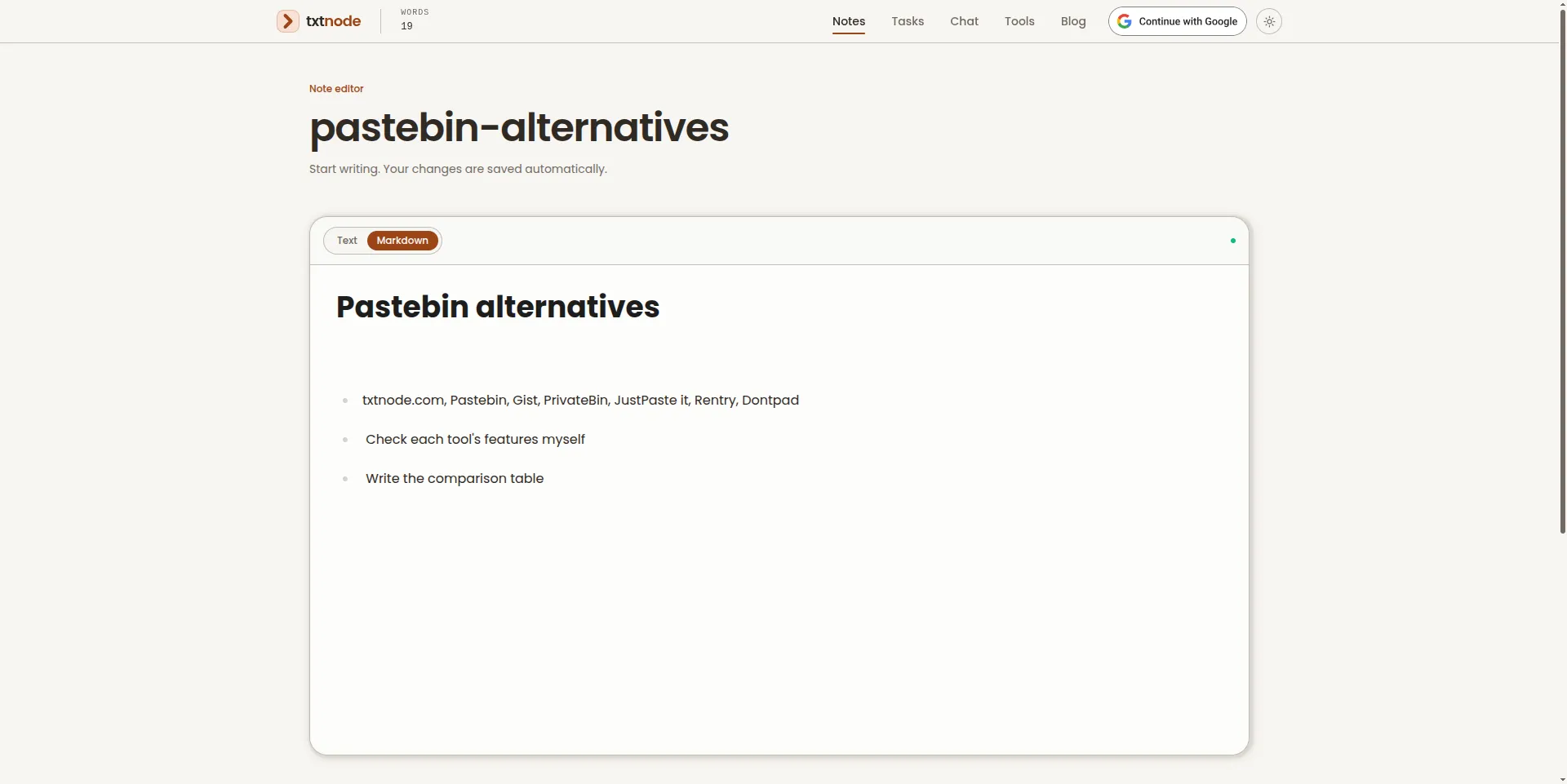
You get an editor with Text and Markdown modes, and your changes save automatically as you type. Anyone with the link can open the same note and edit it, and what they type shows up for you live. It works on a phone as well as a laptop, so you can start on one device and carry on on another. The same site also has developer tools such as a JSON formatter and a JWT decoder, plus a chat for people you know. I wrote more about the idea in What is txtnode?.
Watch out for: a public note is open to anyone who has the link, and can be edited by them too. Don't put passwords, keys or private details in one. It's a place for working notes, not secrets.
Comparison table
| Tool | Account needed to share? | Ads or tracking | Privacy | Edit together live? | Best for |
|---|---|---|---|---|---|
| Pastebin | No (optional) | Ads on the free site | Public, unlisted, private | Not offered | Public snippets |
| GitHub Gist | Yes | None | Public or secret (link works) | No, but forkable | Code with history |
| PrivateBin | No | None stated | Encrypted in the browser | No | Sensitive text |
| JustPaste.it | No | No ads | Anonymous by default | No | Text with images |
| Rentry | No | Check the site | Check the site | Check the site | Markdown pages |
| Dontpad | No | Check the site | Check the site | Check the site | Instant scratchpad |
| txtnode | No | No ads | Open to anyone with the link | Yes | Shared working notes |
Which one should you use?
- Sharing something private or sensitive? Use PrivateBin, where the text is encrypted before it leaves your browser.
- Sharing code you want to keep? Use a Gist. The history and forking are what you're paying for with the account.
- Sharing text with images? JustPaste.it is the easiest.
- Publishing a Markdown page? Try Rentry.
- Need a throwaway page right now? Dontpad is about as fast as it gets.
- Working on something with another person? Use txtnode. Send the link and you're both editing the same note.
- Just a quick, public paste? If you need code highlighting, Pastebin is still fine. If you only need a link to some text, a txtnode note is quicker, and you can keep editing it afterwards.
If you're unsure, ask one question: will it matter if a stranger finds this? If yes, pick PrivateBin. If no, pick whichever tool is fastest for what you're doing.
A note on live editing
If real-time co-editing is what you need, it's worth knowing that tools built for it do exist. Etherpad, for example, is an open source editor with live collaboration and a full revision history, and you can use a public instance with no signup. The tools above are mostly paste-and-view. txtnode sits somewhere between: lighter than a full document editor, but live, so two people can work on a note without any setup.
FAQ
Is Pastebin safe? For public, low-stakes text, yes. Public pastes can be found through search, and the site is a target for spam, so don't paste anything private there.
Can I share text without an account? Yes. Pastebin, PrivateBin, JustPaste.it, Rentry, Dontpad and txtnode all let you share without signing up. GitHub Gist is the one that needs an account.
Can two people edit the same note at the same time? On txtnode, yes: anyone with the link can open and edit the note, and changes appear live. Most paste tools are paste-and-view only.
Is it safe to put passwords in a shared note? No. Anything on a link that anyone can open should be treated as public. For secrets, use an encrypted tool like PrivateBin.
Final thoughts
The right Pastebin alternative depends on what you're sharing and who with. For secrets, use encryption. For code, use a Gist. For a note you and someone else are working on, a shared link you can both edit is hard to beat.
If that last one sounds like you, open a note and see how it feels. It takes about five seconds.
If your problem is less about sharing text and more about a notes app that feels too heavy, see Notion is overkill for quick notes: 6 lightweight alternatives.
Sources: Pastebin FAQ, PrivateBin, JustPaste.it, GitHub Docs: Creating gists, Etherpad, Dontpad